
We use assessments for various purposes:
- To ensure that we are delivering an outstanding experience to participants
- To help us gauge the impact of our programs (both on a per program basis as well as cumulative, and over time).
- To help participants reflect on their experiences
We model assessments in the following ways:
Time Periods
There are three time periods during which participants could be asked to complete an assessment:
- Pre: during the 7 days before the start of a program
- Post: during 7 days following the end of the in-person program
- PostPractice: during the 7 days following the end of the practice period. The end of the practice period is either:
- The end of the capstone (if there is one scheduled)
- The end of the 28-day challenge.
Currently, we schedule the following assessments for those time periods:
| Time Period | Assessments |
| Pre | SIYLI Pre-assessment |
| Post |
Course Evaluation Teacher Evaluations |
| Post Practice | SIYLI Post-assessment |
Note: This list will change slightly depending on the particulars of your program. For example, TT Participants using my.siyli for their practicum will have the ability to opt out of the Pre/Post Assessments.
Seeing responses
You can see how many people have responded to your program's assessments and evals on the main program page in the box on the right-hand side:
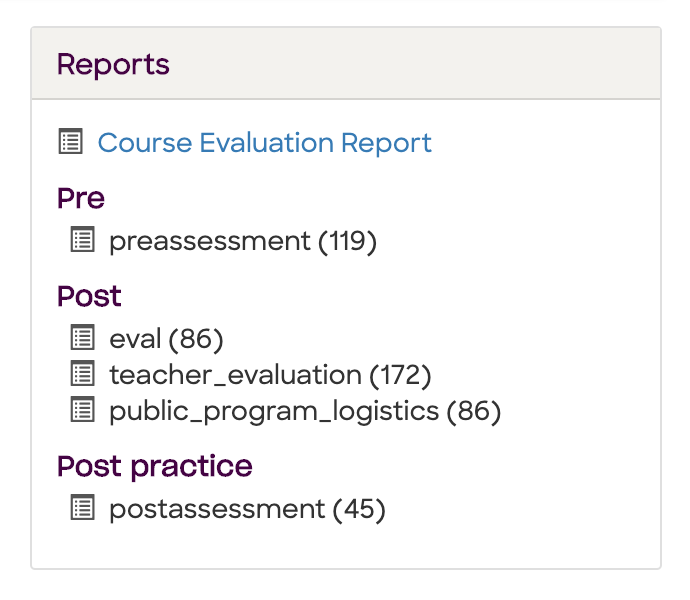
The number in parentheses tells you how many of each type have been completed. The number for teacher evaluations is multiplied by the number of teachers (so it will usually be double the number of evals when you have a co-teacher).
While surveys are active, you will see a box that identifies which participants still need to complete the surveys for that period:
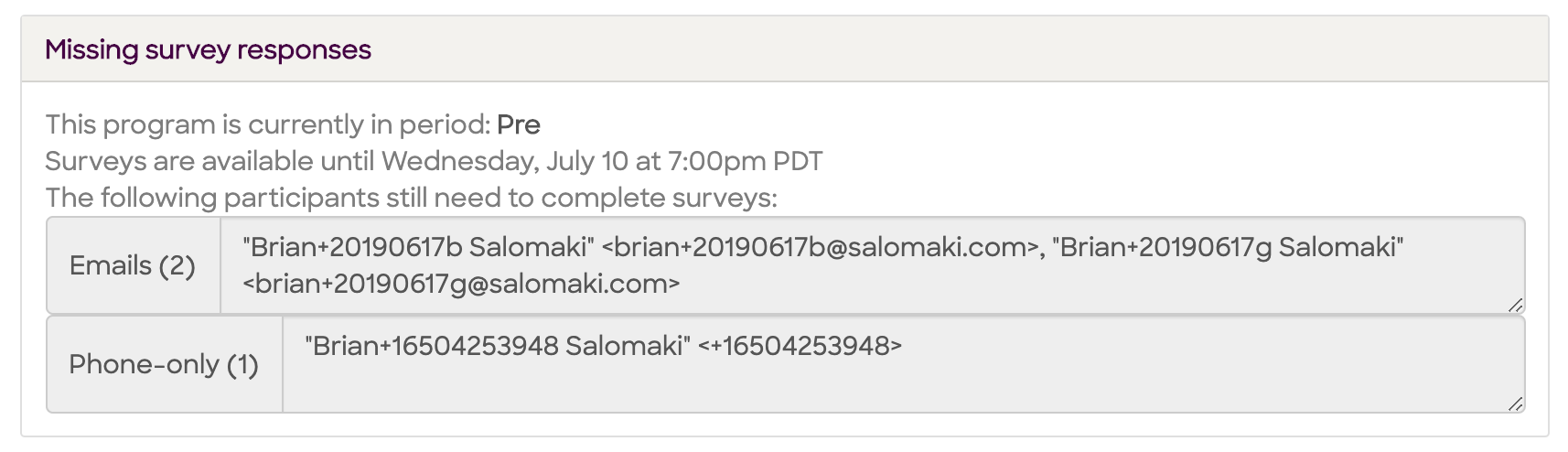
This helps if you'd like to send a followup email to ask them to complete their assessments/evals.
To see detailed responses, you can access the Course Evaluation Report in the Reports box. We'll soon have a pre-/post-assessment comparison available there as well.
Comments
11 comments
Thanks for sharing valuable info!
Flats for sale in Bannerghatta road
Love the "extra fun" you shared. Drift Boss
Self serve custom, simply drag and drop them in the desired order within the settings, helping streamline processes like webesko.
fun riddles for kids Program emails will automatically get sent to participants through my.siyli.org. In some cases you may want to send an additional adhoc email to participants. To do this, go into the program and click "Participants." Scroll down to the bottom of the page the the section "Send Emails" and select "Custom Email"
calcola stipendio netto da lordo Program emails will automatically get sent to participants through my.siyli.org. In some cases you may want to send an additional adhoc email to participants. To do this, go into the program and click "Participants." Scroll down to the bottom of the page the the section "Send Emails" and select "Custom Email"
board foot calculator Program emails will automatically get sent to participants through my.siyli.org. In some cases you may want to send an additional adhoc email to participants. To do this, go into the program and click "Participants." Scroll down to the bottom of the page the the section "Send Emails" and select "Custom Email"
Self serve custom, simply drag and drop them in the desired order within the settings, helping streamline processes like tim hortons menu
Assessments are essential not only for measuring program impact but also for understanding operational efficiency and workforce planning within organizations. For small and medium enterprises, having clarity on payroll structures and employee take-home pay is equally important, and tools like calcolo stipendio netto pmi can support better financial transparency and budgeting decisions. Integrating performance evaluation with accurate salary calculation helps create a more structured and sustainable management approach.
Structured assessments like these highlight how important measurement and reflection are in any structured program. Pre-, Post-, and PostPractice evaluations create a clear before-and-after comparison, helping organizers quantify impact over time rather than relying on assumptions. That same principle of structured input leading to measurable output applies strongly in financial planning.
For instance, individuals who want clarity around their earnings often turn to a calcolatore stipendio netto — a net salary calculator designed to break down gross pay, taxes, and contributions into transparent figures. In Italy, tools built around current IRPEF and INPS rules help users understand exactly how deductions affect take-home pay, much like assessments help program leaders understand outcomes. Both systems rely on defined periods, accurate data collection, and structured reporting to produce meaningful insights rather than guesswork.
Helpful explanation. Having a clear assessment process before and after a program makes a real difference because it gives participants time to reflect while also helping measure progress in a meaningful way. I like how the steps are structured and easy to follow, especially for coordinators managing multiple participants. Practical tools that keep information clear and organized always save time.
Those who successfully finish the two-day SIY program that you lead can be presented with a certificate of completion
astute beta
Please sign in to leave a comment.